MST0052
<!-- .slide: class="title-slide" --> <p class="kicker">MST0052 · Lecture 3 · Fall 2026</p> ## Foundations and<br>Preprocessing Pipelines ### Vegard H. Larsen — BI Norwegian Business School --- <!-- Section A — Opening --> ## Where we are L1 set the course, L2 the tools. Today we start **building**. 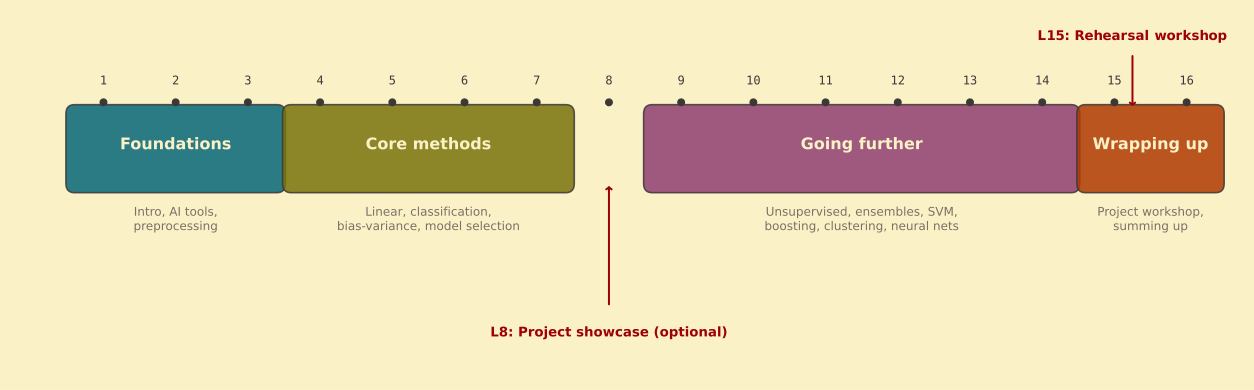 --- <!-- .slide: class="big-statement" --> Preprocessing is a **modelling decision**, not cleanup. Median vs mean, one-hot vs ordinal, drop vs keep — each changes what the model learns. <!-- .element: class="muted" --> --- ## Today's plan - Why preprocessing is **part of the model** - The **split-first rule** and data leakage - scikit-learn `Pipeline` and `ColumnTransformer` - Use of agents - **Worked example:** Titanic, end to end --- ## Project check-in <div class="callout"> **Show of hands** — who has a candidate dataset? A rough problem statement? </div> <p class="muted">No dataset yet? Talk to me after class, or revisit the <strong>dataset pointers</strong> from L1.</p> --- <!-- Section B — Preprocessing is part of the model --> <!-- .slide: class="section-divider" data-background-color="#282828" --> <p class="kicker">01</p> ## Preprocessing is part of the model --- ## What raw data looks like - **Missing values** — `age` is NaN for 20% of rows - **Strings** — `sex = "male"`, the model expects numbers - **Scales** — age in years vs income in thousands - **Outliers & monsters** — a 500-category `city` column --- ## The preprocessing toolkit <div class="cols-3"> <div class="stat stat--word stat--blue"> <span class="stat-value">Impute</span> <span class="stat-label">fill what's missing</span> </div> <div class="stat stat--word stat--green"> <span class="stat-value">Encode</span> <span class="stat-label">categories → numbers</span> </div> <div class="stat stat--word"> <span class="stat-value">Scale</span> <span class="stat-label">comparable units</span> </div> </div> There is no universal checklist — justify each step. <!-- .element: class="muted" --> --- ## One-hot encoding <p class="kicker">One column per category, 0 or 1</p> | embarked | | embarked_C | embarked_Q | embarked_S | |----------|-|------------|------------|------------| | S | → | 0 | 0 | 1 | | C | → | 1 | 0 | 0 | | Q | → | 0 | 1 | 0 | | S | → | 0 | 0 | 1 | Why not S = 1, C = 2, Q = 3? That invents an order the model will take literally. <!-- .element: class="muted" --> --- ## Model choice drives preprocessing <div class="cols"> <div class="callout"> <h3>Distance & linear models</h3> <p>k-NN, logistic regression, PCA, k-means — scaling decides what they see.</p> </div> <div class="callout"> <h3>Tree models</h3> <p>Indifferent to scale. Still need encoding for string columns.</p> </div> </div> Same data, different model → different preprocessing. --- <!-- .slide: class="big-statement" --> A pipeline is a **contract**: the exact transformations applied to any new data. Manual steps don't reproduce at prediction time. <!-- .element: class="muted" --> --- <!-- Section C — The split-first rule --> <!-- .slide: class="section-divider" data-background-color="#282828" --> <p class="kicker">02</p> ## Split first, then fit --- <!-- .slide: class="big-statement" --> **Split first.** Then fit anything that learns from data. Imputers, encoders, scalers, PCA — they all learn. <!-- .element: class="muted" --> --- ## What leakage looks like No error, no warning — just a number that's **too optimistic**. 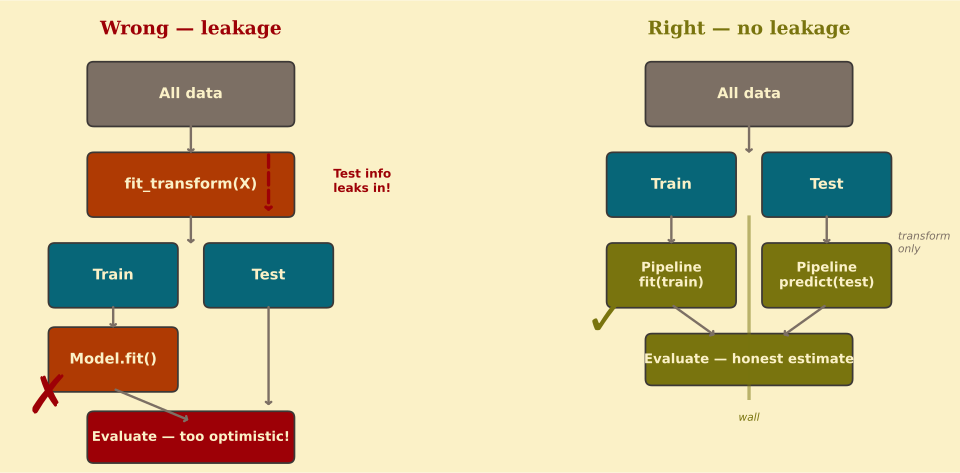 --- ## Leakage in code: scaling <p class="kicker">Wrong — the scaler sees the test set</p> ```python scaler = StandardScaler() X_scaled = scaler.fit_transform(X) # sees ALL data X_train, X_test = train_test_split(X_scaled, ...) ``` <p class="kicker">Right — split first, pipeline</p> ```python X_train, X_test = train_test_split(X, ...) pipe = Pipeline([('scaler', StandardScaler()), ('model', ...)]) pipe.fit(X_train, y_train) # sees only training ``` --- ## Leakage in code: imputation <p class="kicker">Same bug, different channel</p> ```python # Wrong: imputer learns median from full dataset imputer = SimpleImputer(strategy='median') X_imputed = imputer.fit_transform(X) X_train, X_test = train_test_split(X_imputed, ...) ``` The median that fills the test set was computed **from the test set**. --- ## The fix: everything inside the pipeline 1. `train_test_split` → `X_train`, `X_test` 2. `Pipeline` = **all** preprocessing + the model 3. `pipe.fit(X_train, y_train)` — only training data seen 4. `pipe.predict(X_test)` — transforms applied correctly <p class="muted"><code>fit</code> only ever sees training data — guaranteed by construction.</p> --- <!-- Section D — Pipeline and ColumnTransformer --> <!-- .slide: class="section-divider" data-background-color="#282828" --> <p class="kicker">03</p> ## Pipeline & ColumnTransformer --- ## Pipeline basics <p class="kicker">Preprocessing + model · one object</p> ```python from sklearn.pipeline import Pipeline from sklearn.preprocessing import StandardScaler from sklearn.impute import SimpleImputer from sklearn.linear_model import LogisticRegression pipe = Pipeline([ ('imputer', SimpleImputer(strategy='median')), ('scaler', StandardScaler()), ('model', LogisticRegression()) ]) pipe.fit(X_train, y_train) pipe.score(X_test, y_test) ``` Steps run in order. The **last step is the model.** --- ## fit vs transform <div class="cols-3"> <div class="callout"> <h3>fit</h3> <p>Learn parameters — mean, std, categories.</p> </div> <div class="callout"> <h3>transform</h3> <p>Apply the learned parameters.</p> </div> <div class="callout"> <h3>fit_transform</h3> <p>Both at once — training only.</p> </div> </div> Prediction calls only **transform** — that's the anti-leakage mechanism. --- ## One transformer per column type You can't scale a string — or one-hot a number. 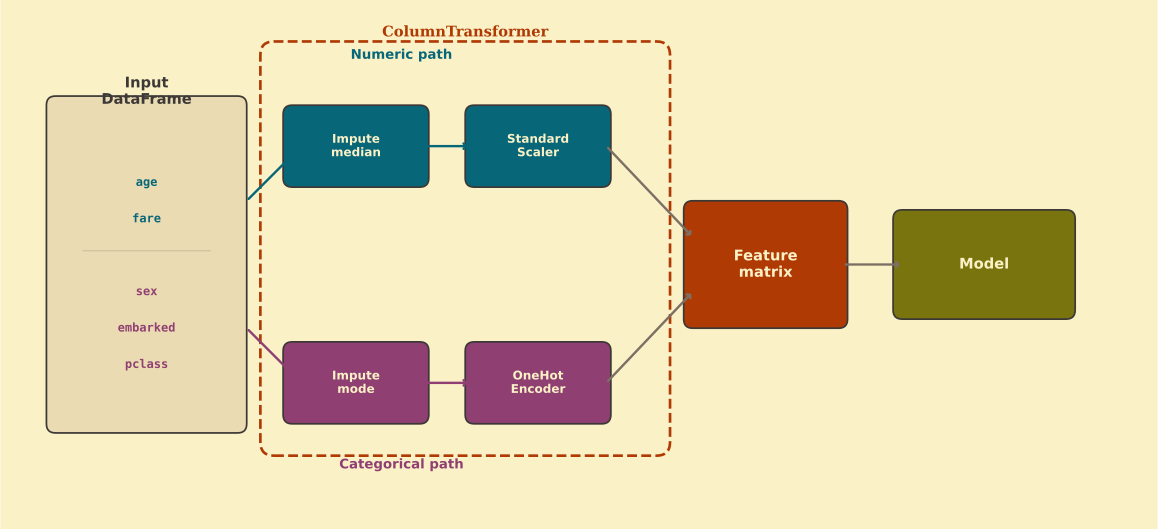 --- ## ColumnTransformer in code <p class="kicker">The diagram, in code</p> ```python num_cols = ['age', 'fare'] cat_cols = ['pclass', 'sex', 'embarked'] preprocessor = ColumnTransformer([ ('num', Pipeline([ ('imputer', SimpleImputer(strategy='median')), ('scaler', StandardScaler()), ]), num_cols), ('cat', Pipeline([ ('imputer', SimpleImputer(strategy='most_frequent')), ('encoder', OneHotEncoder(handle_unknown='ignore')), ]), cat_cols), ]) ``` --- ## Full pipeline <p class="kicker">Everything · one object</p> ```python pipe = Pipeline([ ('prep', preprocessor), ('model', LogisticRegression(max_iter=200)) ]) pipe.fit(X_train, y_train) print(f"Test accuracy: {pipe.score(X_test, y_test):.3f}") ``` Reproducible. Portable. No manual steps. <!-- .element: class="muted" --> --- ## Preprocessing components <p class="kicker">Reference — screenshot this</p> | Component | When to use | |-----------|-------------| | `SimpleImputer` | NaNs present — fill with median / most frequent | | `StandardScaler` | Linear models, k-NN, SVM, PCA | | `MinMaxScaler` | When you need bounded [0, 1] features | | `OneHotEncoder` | Nominal categories, low/medium cardinality | | `OrdinalEncoder` | Ordered categories, tree models | | `FunctionTransformer` | Custom transforms (log, …) | --- <!-- Section E — Worked example: Titanic --> <!-- .slide: class="section-divider" data-background-color="#282828" --> <p class="kicker">04</p> ## Worked example — Titanic --- ## The brief <p class="kicker">Predict survival · the L2 pattern, now with real mess</p>  --- ## Step 1 — Load and inspect <p class="kicker">Step 1 · Load & inspect</p> ```python import pandas as pd import seaborn as sns df = sns.load_dataset('titanic') print(df.info()) print(df.isnull().sum()) ``` --- ## Step 1 — What's missing <p class="kicker">Step 1 · The missing-data picture</p> 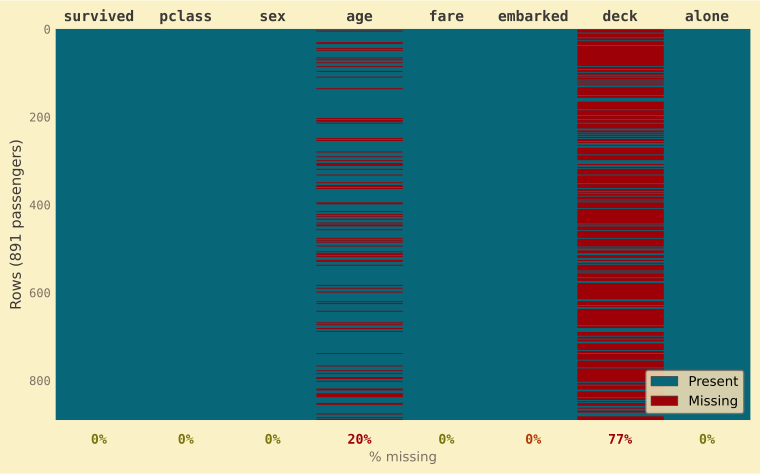 <p class="chips">Keep <code>pclass</code> <code>sex</code> <code>age</code> <code>fare</code> <code>embarked</code> — <strong>drop <code>deck</code></strong> (77% missing)</p> --- ## Step 2 — Split first <p class="kicker">Step 2 · Split before anything fits</p> ```python from sklearn.model_selection import train_test_split features = ['pclass', 'sex', 'age', 'fare', 'embarked'] X = df[features] y = df['survived'] X_train, X_test, y_train, y_test = train_test_split( X, y, test_size=0.2, random_state=42, stratify=y ) ``` <p class="muted"><code>stratify=y</code> keeps the survival ratio balanced in both sets.</p> --- ## Step 3 — The pipeline you already know <p class="kicker">Step 3 · Preprocessor + model</p> ```python preprocessor = ColumnTransformer([ ('num', Pipeline([ ('imputer', SimpleImputer(strategy='median')), ('scaler', StandardScaler()), ]), ['age', 'fare']), ('cat', Pipeline([ ('imputer', SimpleImputer(strategy='most_frequent')), ('encoder', OneHotEncoder(handle_unknown='ignore')), ]), ['pclass', 'sex', 'embarked']), ]) pipe = Pipeline([ ('prep', preprocessor), ('model', LogisticRegression(max_iter=200)) ]) ``` --- ## Step 4 — Fit and evaluate <p class="kicker">Step 4 · Fit & evaluate</p> ```python from sklearn.metrics import classification_report pipe.fit(X_train, y_train) y_pred = pipe.predict(X_test) print(classification_report(y_test, y_pred)) ``` ~79% accuracy. Good? **Compared to what?** --- ## Compared to what? <div class="cols"> <div class="stat stat--red"> <span class="stat-value">62%</span> <span class="stat-label">always predict<br>"did not survive"</span> </div> <div class="stat stat--green"> <span class="stat-value">79%</span> <span class="stat-label">the pipeline</span> </div> </div> Always know your **baseline.** --- ## Step 5 — Cross-validate <p class="kicker">Step 5 · Cross-validate</p> ```python from sklearn.model_selection import cross_val_score scores = cross_val_score(pipe, X_train, y_train, cv=5, scoring='accuracy') print(f"CV accuracy: {scores.mean():.3f} ± {scores.std():.3f}") ``` <p class="muted">CV on the <strong>training set</strong> — the test set stays untouched. The L2 pattern.</p> --- <!-- Section F — Your project --> <!-- .slide: class="section-divider" data-background-color="#282828" --> <p class="kicker">05</p> ## Your project: features & reporting --- ## Feature engineering preview - **Log-transform** skewed features (income, price) - **Interactions** — age × class - **Date parts** — weekday, month - **Binning** — age groups --- ## Custom transforms, same pattern <p class="kicker">FunctionTransformer · log inside the pipeline</p> ```python from sklearn.preprocessing import FunctionTransformer import numpy as np log_transform = FunctionTransformer(np.log1p, validate=True) preprocess = make_column_transformer( (make_pipeline(SimpleImputer(strategy='median'), log_transform, StandardScaler()), ['fare']), # ... other columns as before ) ``` --- ## What to report <div class="checklist"> - Variables **kept, dropped, grouped** — and why - **Missing-value** strategy — and why that one - **Encoding and scaling** choices, per model - All of it **inside the pipeline** </div> --- ## Common mistakes <ul class="checklist"> <li class="no"><em>"I standardised all features"</em> — for a random forest</li> <li class="no"><em>"I dropped all rows with missing values"</em> — 30% of the data</li> <li class="no"><em>"I one-hot encoded city"</em> — 500 unique values</li> </ul> The fix: **justify** each choice — data and model. --- <!-- Section G — Wrap-up --> <!-- .slide: class="section-divider" data-background-color="#282828" --> <p class="kicker">06</p> ## Wrap-up --- ## Three words for the semester <div class="cols-3"> <div class="stat stat--word stat--blue"> <span class="stat-value">Split</span> <span class="stat-label">first, always</span> </div> <div class="stat stat--word stat--green"> <span class="stat-value">Pipeline</span> <span class="stat-label">preprocessing + model</span> </div> <div class="stat stat--word"> <span class="stat-value">Justify</span> <span class="stat-label">every choice, in writing</span> </div> </div> --- ## Before Lecture 4 <div class="checklist"> - Run today's Titanic pipeline on **your own machine** - Start the pipeline pattern on **your own dataset** - Read ahead: L4 is **linear models** — OLS, ridge, lasso - **L8 showcase:** sign up in Canvas by **Tue 6 Oct** if you want a slot </div> All the code is on the course site. <!-- .element: class="muted" --> --- <!-- .slide: class="big-statement" --> ## Questions Backup slides below — press down ↓ <!-- .element: class="muted" --> -- ## Ordinal vs one-hot encoding <div class="cols"> <div class="callout"> <h3>One-hot</h3> <p>Nominal categories, no order — colour, city, sex.</p> </div> <div class="callout"> <h3>Ordinal</h3> <p>Ordered categories — low/medium/high, education level.</p> </div> </div> <p class="muted"><strong>Watch out:</strong> one-hot on a 500-category column creates 500 columns. Group rare categories, or consider target encoding.</p> -- ## Handling outliers - **Clip** — cap at a percentile (1st / 99th) - **Winsorise** — replace extremes with the boundary value - **IQR flag** — mark values beyond 1.5 × IQR When to leave them alone: when they're real and informative. <!-- .element: class="muted" --> -- ## Missing data patterns | Pattern | Meaning | Implication | |---------|---------|-------------| | **MCAR** | Missing completely at random | Safe to impute or drop | | **MAR** | Depends on observed data | Imputation works, be careful | | **MNAR** | Depends on the missing value itself | Imputation is biased | <p class="muted">Most project datasets are MCAR or MAR. Suspect MNAR? Discuss it in your report.</p> -- ## Shorthand: make_pipeline ```python from sklearn.pipeline import make_pipeline from sklearn.compose import make_column_transformer preprocess = make_column_transformer( (make_pipeline(SimpleImputer(strategy='median'), StandardScaler()), num_cols), (make_pipeline(SimpleImputer(strategy='most_frequent'), OneHotEncoder(handle_unknown='ignore')), cat_cols), ) pipe = make_pipeline(preprocess, LogisticRegression(max_iter=200)) ``` Same result, less typing — steps are auto-named. <!-- .element: class="muted" --> -- ## Second worked example: Ames Housing <p class="kicker">Same pattern · regression target</p> ```python from sklearn.preprocessing import OrdinalEncoder from sklearn.linear_model import Ridge preprocessor = ColumnTransformer([ ('num', make_pipeline(SimpleImputer(strategy='median'), StandardScaler()), num_cols), ('ord', OrdinalEncoder(), ord_cols), ('cat', make_pipeline(SimpleImputer(strategy='most_frequent'), OneHotEncoder(handle_unknown='ignore')), cat_cols), ]) pipe = make_pipeline(preprocessor, Ridge()) ``` Only the model and the column groupings change. <!-- .element: class="muted" --> -- ## Inspecting pipeline internals <p class="kicker">Debugging · what does the model actually see?</p> ```python # Access named steps pipe.named_steps['prep'] # Transform training data without predicting X_transformed = pipe[:-1].transform(X_train) print(X_transformed.shape) # Get feature names after encoding pipe.named_steps['prep'].get_feature_names_out() ``` --- ## What's next **Lecture 4:** Linear models for prediction - Ordinary least squares as your first baseline - Ridge and lasso regularisation - When to penalise